Best AI Tools for College Students Free 2026
The complete authority guide to 10 free AI platforms that save students 10+ hours per week — tested in real classrooms.

⚡ Executive Summary
The best AI tools for college students free 2026 cover four core academic needs: writing, research, study organization, and presentations. This guide reviews ten verified free platforms — ChatGPT, Google Gemini, NotebookLM, Perplexity, Grammarly, QuillBot, Notion AI, Canva AI, Microsoft Copilot, and Claude — with feature breakdowns, comparison tables, and responsible-use frameworks built on real classroom workflows.
Introduction
🎓 Why College Students Are Using AI in 2026
College workloads have intensified in 2026. Students juggle heavier reading lists, group projects, internships, and part-time work. The best free AI tools now act as 24/7 study companions — drafting outlines, explaining dense concepts, transcribing lectures, and organizing notes. Universities from MIT to Stanford have published official guidance acknowledging that great AI tools are part of modern academic life.
💸 Free vs Paid AI Tools
Paid plans unlock faster models and unlimited usage, but the best free AI tools cover roughly 90% of undergraduate needs. For most students, stacking two or three free platforms outperforms paying for a single premium subscription.
🔍 How This List Was Selected
Each tool on this list of best AI tools meets four criteria: a permanent free tier, active development in 2026, demonstrated educational value, and verified safety for academic environments. We tested every platform across writing, research, coding, and study workflows.
⚠️ Quick Disclaimer:
Use AI to learn — not to replace learning. Submitting raw AI output as your own work violates nearly every university academic integrity policy.
For more student-focused resources, visit the AIPROSTUDY homepage or browse the full AI tool directory.
What Makes an AI Tool Worth Using for College Students?
🎯 Featured Snippet
What makes an AI tool good for students?
A college-ready AI tool offers a permanent free plan, supports academic writing and research, includes citation features, integrates with common platforms (Google Docs, Word, PDF), and respects university academic integrity guidelines.
✅ Free Plan Availability
A genuine free tier — not a 7-day trial — is non-negotiable. Top free AI tools like ChatGPT, Gemini, and NotebookLM offer unlimited or generous daily access without credit card requirements.
📝 Study and Productivity Features
Strong tools support summarization, flashcard generation, note management, and task tracking. The best AI note taking app combines transcription with semantic search across your materials.
🔬 Research Support
Citation-backed answers separate research-grade platforms from chatbots. Perplexity and Consensus link every claim to peer-reviewed sources — essential for theses, lit reviews, and capstone projects.
🚀 Ease of Use for Beginners
A clean interface and prompt suggestions lower the learning curve. The smartest AI chat platforms guide first-time users through their first ten interactions.
⚖️ Academic Integrity Considerations
Choose tools that disclose data usage, allow private mode, and produce content you can verify. Pair every AI draft with the best AI plagiarism checker and an AI content detector before submission.
✔️ The 5-Point Selection Checklist:
- Permanent free tier with no credit card
- Source citations or transparent reasoning
- PDF and document upload support
- Privacy-respecting data policies
- Active updates through 2026
Quick Comparison Table
Here’s the at-a-glance breakdown of the top 10 best free AI tools for college students in 2026:
| Tool | Best For | Free Version | Platforms | Main Limitation |
|---|---|---|---|---|
| ChatGPT | Overall study assistant | ✅ Yes (GPT-4o mini) | Web, iOS, Android | Daily message cap |
| Google Gemini | Research + Workspace | ✅ Yes | Web, Android, iOS | Limited deep reasoning |
| NotebookLM | Notes & PDFs | ✅ 100% free | Web | Source-grounded only |
| Perplexity | Cited research | ✅ Yes | Web, iOS, Android | Pro searches limited |
| Grammarly | Writing polish | ✅ Yes | Web, Desktop, Mobile | Advanced features locked |
| QuillBot | Paraphrasing | ✅ Yes | Web, Extension | 125-word free limit |
| Notion AI | Study organization | ⚠️ Trial | Web, Desktop, Mobile | 20 free AI uses |
| Canva AI | Presentations | ✅ Yes | Web, Mobile | Premium templates locked |
| Microsoft Copilot | Office documents | ✅ Yes (basic) | Web, Windows, Mobile | Office 365 for full |
| Claude | Long PDFs | ✅ Yes | Web, iOS, Android |
1
ChatGPT — Best Overall Free AI Study Assistant
OpenAI’s ChatGPT remains the best GPT chat app and the most widely adopted AI assistant on college campuses. The free plan in 2026 includes GPT-4o mini access, image input, and limited GPT-4o usage — making it the smartest AI chat for daily academic tasks.
🔑 Key Features
- Multimodal input (text, image, voice)
- Custom instructions for academic context
- Memory across sessions
- Web browsing and file analysis
✅ Pros
- Excellent reasoning across subjects
- Massive prompt library and community
- Best ChatGPT app on iOS & Android
❌ Cons
- Free tier rate limits at peak hours
- Occasional factual hallucinations
🎯 Best Use Cases
- Essay outlining and editing
- Concept explanation and tutoring
- Coding help and debugging
- Interview and presentation prep
💬 Example Prompt for Students
“Act as a senior tutor in microeconomics. Explain price elasticity using two real-world examples, then quiz me with three multiple-choice questions and grade my answers.”
2
Google Gemini — Best for Research & Workspace
Google Gemini is the best AI assistant app for students already living inside Google Docs, Sheets, and Slides. Its tight Workspace integration makes it one of the top AI tools free for assignment-heavy weeks.
⭐ Why Students Like It
Gemini pulls in real-time Google Search data — meaning current statistics, recent papers, and updated definitions appear in answers. A major advantage for current-events courses and journalism majors.
🎁 Free Features
- Gemini 2.5 Flash access
- Image generation and analysis
- Direct integration with Docs and Gmail
- Deep Research (limited free runs)
📌 Best Assignments for Gemini
- Current-events analysis
- Spreadsheet formulas and data tasks
- Email and cover letter drafting
- Multilingual translation projects
3
NotebookLM — Best for Notes & PDF Study
NotebookLM is Google’s free, source-grounded study workspace — arguably the best AI note taking app released this decade.
📤 Upload Lecture Notes
Upload up to 50 sources per notebook: PDFs, slides, Google Docs, web links, and YouTube videos. Every answer is grounded in your uploaded material.
📝 Generate Summaries
One click produces executive summaries, key concepts, and topic clusters from a 200-page textbook chapter.
📚 Create Study Guides
Auto-generated study guides include definitions, possible exam questions, and a glossary tailored to your sources.
🎧 Turn Notes into Revision Material
The Audio Overview feature converts notes into a two-host podcast — ideal for commuting students and auditory learners.
💎 Standout Features:
- 100% free with no usage cap
- Source citations on every sentence
- Audio podcast generation
- FAQ and timeline auto-creation
4
Perplexity — Best AI Research Assistant
Perplexity sits at the intersection of search engine and AI chat. Widely considered one of the best free online AI chatbot platforms for academic research.
🔗 Citation-Based Answers
Every Perplexity response includes inline citations linked to original sources — academic journals, news outlets, and reputable websites. Essential for any research paper or thesis.
⚙️ Research Workflow
Use Focus modes to restrict searches to Academic, Reddit, YouTube, or general web. Save searches into Spaces for ongoing projects.
⚖️ Pros & Limitations
✅ Pros
- Real citations every time
- Fast, focused answers
❌ Cons
- Pro searches capped daily
- Limited creative writing
5
Grammarly — Best for Writing Improvement
Grammarly remains the gold standard for student writing. It functions as a free AI writer, plagiarism flagger, and tone advisor in one extension.
✏️ Grammar Checking
Real-time corrections across browsers, Word, and Google Docs catch errors most spell-checkers miss.
🎓 Academic Writing Support
Formality scoring, citation suggestions, and conciseness checks align writing with academic standards.
🎁 Free Features
- Grammar and spelling corrections
- Tone detector
- Generative rewrites (limited prompts)
- Browser extensions on Chrome, Firefox, Edge
6
QuillBot — Best for Summaries & Rewriting
QuillBot is one of the best free AI writing tools and a favorite for non-native English speakers tackling US college coursework.
🔄 Paraphrasing
Seven paraphrasing modes — Standard, Fluency, Formal, Academic, Simple, Creative, and Shorten — adjust tone for any assignment.
📋 Summarizer
Paste a 5,000-word article and receive bullet-point or paragraph summaries instantly.
🎯 Student Use Cases
- Rewriting clunky sentences without changing meaning
- Compressing readings before lectures
- Improving fluency in second-language writing
- Generating multiple thesis variations
7
Notion AI — Best for Organizing Study Life
Notion AI turns your study workspace into an intelligent assistant — one of the best AI task manager options for college students.
🗂️ Notes Management
Summarize long lecture notes, extract action items, and link related class topics automatically.
✅ Task Tracking
AI-generated to-do lists pull due dates from your syllabus and prioritize by deadline weight.
📐 Study Templates
- Semester dashboards
- Cornell note templates
- Exam revision trackers
- Reading list databases
For tested templates, see our study tips library.
8
Canva AI — Best for Presentations
Canva AI (Magic Studio) is the easiest path to professional slide decks, posters, and visual reports.
🎨 Presentation Creation
Magic Design generates a full 10-slide deck from a single prompt — ideal for last-minute class presentations.
🖼️ Visual Assignments
Magic Media creates AI illustrations and even AI images for D&D-style creative writing courses.
🎁 Free Design Features
- Magic Write (AI text generator)
- Background remover (limited)
- Thousands of free templates
- Real-time collaboration

9
Microsoft Copilot — Best for Office Users
Microsoft Copilot brings GPT-4-class power to Word, Excel, and PowerPoint — free in browser form for any student.
📄 Word Assistance
Draft outlines, rewrite paragraphs, and summarize long documents directly inside Word.
📊 Excel Support
Natural-language formula generation makes statistics and finance coursework dramatically easier.
🎞️ Presentation Help
Generate slide structures and speaker notes from a Word document in seconds — now standard in business schools.
10
Claude — Best for Long Documents
Anthropic’s Claude handles 200,000+ token contexts — easily the best AI tool for processing entire textbooks, dissertations, and case studies in a single conversation.
📑 Reading Long PDFs
Upload an entire 300-page PDF and ask page-specific questions with full document awareness.
🔍 Long Context Analysis
Compare two long documents side by side — perfect for literature reviews and comparative essays.
🎓 Research Support
Claude’s careful reasoning makes it one of the smartest AI chat options for nuanced humanities work.
📊 Feature Score Across Top 10 Tools
Scored 1–10 by AIPROSTUDY editorial testing, Q1 2026.
| Tool | Writing | Research | Notes | Speed | Free Value |
|---|---|---|---|---|---|
| ChatGPT | 10 | 8 | 8 | 9 | 9 |
| Gemini | 9 | 9 | 8 | 9 | 9 |
| NotebookLM | 7 | 9 | 10 | 8 | 10 |
| Perplexity | 7 | 10 | 7 | 10 | 9 |
| Grammarly | 10 | 5 | 4 | 10 | 9 |
| QuillBot | 9 | 6 | 5 | 10 | 8 |
| Notion AI | 7 | 6 | 10 | 8 | 6 |
| Canva AI | 6 | 4 | 5 | 9 | 9 |
| Copilot | 9 | 8 | 8 | 9 | 9 |
| Claude | 10 | 9 | 9 | 8 | 9 |
From Failing Drafts to Honors Thesis
⚠️ Problem
Maya, a junior English major, struggled to organize a 60-page honors thesis on Toni Morrison’s later works. Her drafts lacked thematic cohesion.
⚙️ Process
She uploaded all sources into NotebookLM, used Claude for chapter analysis, ran paragraphs through Grammarly, and verified citations with Perplexity.
🏆 Outcome
The thesis received departmental honors and a nomination for the campus undergraduate research award.
💡 Lesson Learned
Stacking three to four specialized AI tools outperforms relying on a single generalist platform.
🎯 Best AI Tool by Student Need
🔬 For Research
Perplexity for citations; Claude for long-document synthesis; NotebookLM for source-grounded answers.
📝 For Assignments
ChatGPT for brainstorming; Grammarly for editing; QuillBot for paraphrasing.
🎨 For Presentations
Canva AI for slide design; Copilot for PowerPoint; Gemini for image creation.
📚 For Exam Prep
NotebookLM for flashcards; ChatGPT for practice questions; Claude for textbook analysis.
⚡ For Productivity
Notion AI for organization; Reclaim for scheduling; Otter for lecture transcription.
Explore curated student-tested prompts for each workflow.
⚖️ How College Students Should Use AI Responsibly
🎯 Featured Snippet
How should students use AI responsibly?
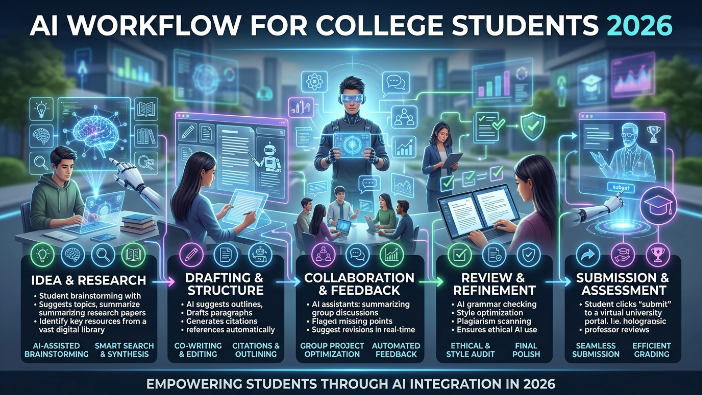
Students should use AI for brainstorming, explanation, and editing — never for copy-paste submission. Always verify facts, cite sources, and follow university academic integrity policies.
🚫 Avoid Copy-Paste Submission
Submitting unedited AI output is academic misconduct at nearly every accredited US university. Always rewrite in your own voice.
🔍 Verify Facts
AI models hallucinate. Cross-check every statistic, quote, and citation with primary sources.
🧠 Use AI for Understanding
The highest-value use case is concept clarification — asking AI to explain a topic five different ways until it clicks.
📜 Follow University Policies
Review your syllabus for AI clauses. When in doubt, ask the professor. Transparency protects your transcript.
The First-Gen CS Student Who Landed a FAANG Internship
⚠️ Problem
Daniel, a first-generation CS sophomore, lacked mentorship and struggled with data structures coursework.
⚙️ Process
He used GitHub Copilot for code, ChatGPT for algorithm explanations, and Claude for mock technical interviews. He logged sessions in Notion AI.
🏆 Outcome
Daniel passed three technical screens and accepted a summer SWE internship at a top-five tech company.
💡 Lesson Learned
Free AI tools can replicate mentorship gaps when used with discipline and verification.
⚠️ Common Mistakes Students Make with AI
🚫 Overdependence
Students who outsource thinking lose recall and critical reasoning over time. AI should sharpen — not replace — your mind.
📚 Ignoring Sources
Citing AI as a source is unacceptable in academic writing. Always trace claims back to primary literature.
🔧 Using Too Many Tools
Subscription fatigue and workflow confusion hurt more than they help. Master two or three tools deeply.
❌ Top Mistakes to Avoid:
- Don’t paste sensitive data into free models
- Don’t trust AI-generated citations without verification
- Don’t submit AI output without substantial editing
- Don’t ignore your university’s disclosure rules
❓ Frequently Asked Questions
Q1. What is the best free AI tool for college students?
ChatGPT is the best overall free AI tool for college students in 2026, with NotebookLM ranking highest for study and PDF-based research.
Q2. Is ChatGPT free for students?
Yes. ChatGPT offers a permanent free tier including GPT-4o mini and limited GPT-4o access. No credit card is required.
Q3. Which AI tool is best for assignments?
ChatGPT and Claude lead for assignments, while Grammarly and QuillBot polish final drafts.
Q4. Can universities detect AI content?
Yes. Tools like Turnitin AI, GPTZero, and Copyleaks detect AI-generated text with growing accuracy. Always edit and verify.
Q5. Is AI allowed in college?
Policies vary by school and class. Many universities permit AI for brainstorming and editing but ban submission of raw AI output. Always check your syllabus.
Q6. Are there free AI voice generators for student projects?
Yes. ElevenLabs Free, Murf Free, and Microsoft Edge Read Aloud are popular best free AI voice generators for podcasts and class videos.
Q7. What is the best AI plagiarism checker for students?
Grammarly’s free plagiarism detection and QuillBot’s plagiarism checker are the most accessible options for undergraduate work.
🎯 Final Recommendations
The best AI tools for college students free 2026 are not a single platform — they are a personal stack. Start with ChatGPT for general assistance, NotebookLM for studying, and Perplexity for research. Add Grammarly and Canva AI as your workload demands.
Master two or three tools deeply before exploring others. Verify every fact. Edit every draft. Disclose AI use where required. Done right, these free AI platforms will save hundreds of hours and meaningfully improve your academic outcomes.
👉 Ready to start your AI study journey?
📚 Resources
Written By
AIPROSTUDY Editorial Team
A collective of SEO strategists, AI researchers, educators, and digital-growth specialists dedicated to helping students navigate the evolving artificial intelligence landscape. Combined experience across academic publishing, machine learning, EdTech, and SEO. Every guide is fact-checked, classroom-tested, and updated against the latest AI model releases.